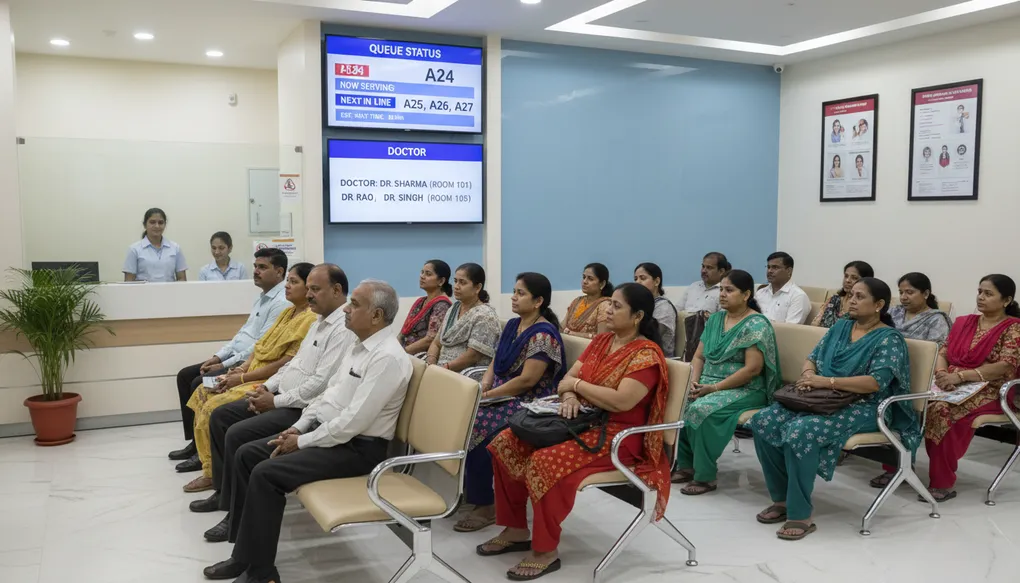
Appointment and Queue Workflows
Optimize your clinic appointment and queue management—reduce wait times, improve patient satisfaction, and manage busy OPDs smoothly.
Managing patient flow is one of the biggest daily challenges in Indian clinics. Between scheduled appointments, walk-ins, emergencies, and the inevitable delays, keeping everyone informed and satisfied requires constant communication. This guide builds on G1 (Patient Communication Basics) to help you create efficient workflows that reduce chaos and improve patient experience.
What Problem This Solves
Every clinic faces these daily struggles:
Queue Chaos
- Patients arriving without knowing wait times
- Confusion about token numbers vs. appointment times
- Walk-ins disrupting scheduled appointments
- Patients leaving due to long waits without informing staff
Communication Gaps
- Patients not knowing about delays until they arrive
- No system for informing patients about emergencies affecting schedule
- Difficulty managing expectations during festive rush (Diwali, wedding season)
- Handling complaints from frustrated patients waiting too long
Scheduling Conflicts
- Overbooking leading to patient dissatisfaction
- No-shows wasting valuable slots
- Emergency cases disrupting entire day’s schedule
- Peak hour bottlenecks (typically 10 AM - 1 PM, 5 PM - 8 PM)
The Cost: Frustrated patients, stressed staff, negative reviews, and lost patients who never return.
The Solution: Pre-written templates and workflows that keep patients informed at every stage.
How to Do It (Steps)
Step 1: Map Your Clinic’s Flow
Before creating templates, understand your specific patterns:
Morning Rush: 9 AM - 12 PM (usually busiest)
Lunch Lull: 12 PM - 4 PM (slower, good for procedures)
Evening Rush: 5 PM - 8 PM (working patients prefer this)
Prompt to analyze your patterns:
I run a [SPECIALTY] clinic in [CITY]. My OPD timings are [TIMINGS].
Typical patient volume: [NUMBER] patients/day.

Help me identify:
1. Optimal slot duration for different visit types
2. How many walk-in slots to reserve
3. Buffer time recommendations
4. Emergency slot placement
Step 2: Create Your Communication Templates
You need templates for these scenarios:
- Appointment confirmation
- Day-before reminder
- Delay notifications
- Queue updates
- No-show follow-ups
- Emergency rescheduling
Step 3: Set Up Trigger Points
Decide WHEN each message goes out:
- Confirmation: Immediately after booking
- Reminder: Evening before (6-8 PM works best)
- Delay notice: When delay exceeds 20 minutes
- Queue update: Every 30 minutes during busy periods
Step 4: Train Staff on Templates
Create a simple reference card:
- Which template for which situation
- What placeholders to fill
- When to escalate to doctor
Example Prompts
Prompt 1: Complete Appointment System
Create a complete appointment communication system for my clinic:

Clinic: [CLINIC NAME]
Specialty: [SPECIALTY]
Location: [AREA, CITY]
OPD Timings: [MORNING/EVENING TIMINGS]
Average consultation time: [X] minutes

I need WhatsApp message templates for:
1. Booking confirmation (include address, what to bring)
2. Day-before reminder (with option to reschedule)
3. Morning-of reminder (for afternoon appointments)
4. Running late notification (15 min, 30 min, 45+ min versions)
5. Your turn is coming (2 patients before)
6. Thank you + follow-up reminder

Make messages:
- Short (under 160 characters where possible)
- Professional but warm
- Include necessary details only
- Easy to read on mobile
- In English with Hindi words where natural

For each template, tell me WHEN to send it.
Prompt 2: Walk-In Management System
My clinic sees both appointment and walk-in patients. Help me create a fair system.

Current situation:
- [X]% appointments, [Y]% walk-ins
- Walk-ins often complain about waiting
- Appointment patients upset when walk-ins seen first
- Peak walk-in times: [TIMES]

Create:
1. A clear policy I can display at reception
2. Script for receptionist to explain wait times to walk-ins
3. Message template for walk-ins who leave contact number
4. Fair queue system that respects both types
5. Communication for appointment patients when emergency walk-in taken first
Prompt 3: Delay Management Communication
I'm a [SPECIALTY] doctor. Sometimes consultations take longer than expected,
or emergencies cause delays.

Create a delay communication protocol:

1. What to tell waiting patients at 15-minute delay
2. What to say at 30-minute delay
3. Message for 45+ minute delay (offer rescheduling)
4. How to announce delay to entire waiting room
5. What receptionist should say to angry patients
6. WhatsApp message for patients yet to arrive

Tone: Apologetic but professional. Acknowledge their time is valuable.
Include specific phrases to calm frustrated patients.
Prompt 4: Festival/Peak Season Management
Help me prepare communication for Diwali week when my clinic will be very busy.

Situation:
- Last OPD before 5-day break: [DATE]
- Expect 2x normal patient volume
- Many will want prescriptions refilled
- Some will want last-minute checkups

Create:
1. Advance notice to regular patients (1 week before)
2. Message explaining extended wait times during rush
3. Quick prescription refill process announcement
4. Priority system announcement (sick patients vs. routine)
5. Post-holiday reopening message
Prompt 5: Queue Token System Explanation
I'm implementing a token system in my clinic. Create clear communication for:

System details:
- Tokens given at arrival
- Display shows current token
- Average wait: 15 min per token
- Separate queue for: follow-ups, new patients, procedures

Need:
1. Sign/poster explaining the system (simple language, can include Hindi)
2. What receptionist tells each patient when giving token
3. Display board format
4. WhatsApp update format for patients who step out
5. What to say when someone misses their token
Bad Prompt → Improved Prompt
Bad Prompt:
Write appointment messages for my clinicWhy it fails: No context about clinic type, timing, patient demographics, or specific scenarios.
Improved Prompt:
Write appointment reminder messages for my pediatric clinic in Pune.

Context:
- Patients are parents of children 0-12 years
- OPD: 10 AM - 1 PM, 5 PM - 8 PM
- Average wait: 20 minutes
- We see both appointments and walk-ins
- 70% patients prefer WhatsApp communication

Create messages for:
1. Appointment confirmation (include parking info - limited street parking)
2. Reminder 1 day before
3. Running 30 minutes late notification
4. "You're next" alert
5. No-show follow-up (gentle, as parents often have child emergencies)

Each message should:
- Be under 200 characters
- Sound caring (we're dealing with worried parents)
- Include only essential information
- Have a professional but warm tone
Common Mistakes
Mistake 1: Sending Too Many Messages
Problem: 5 reminders for one appointment annoys patients. Solution: Maximum 3 messages - confirmation, one reminder, and day-of update only if needed.
Mistake 2: Vague Time Estimates
Problem: “Doctor will see you soon” means nothing. Solution: Give specific estimates: “Approximately 20 minutes wait, 3 patients before you.”
Mistake 3: No Delay Communication
Problem: Patients wait without any updates, frustration builds. Solution: Proactive updates every 20-30 minutes during delays.
Mistake 4: Same Message for All Situations
Problem: Generic messages feel impersonal. Solution: Different templates for different scenarios (new patient vs. follow-up, routine vs. urgent).
Mistake 5: Ignoring No-Shows
Problem: Wasted slots and no feedback on why they didn’t come. Solution: Gentle follow-up message + easy rescheduling option.
Mistake 6: Not Managing Walk-In Expectations
Problem: Walk-ins expect to be seen immediately. Solution: Clear communication AT ARRIVAL about expected wait time.
Mistake 7: Overbooking Without Buffer
Problem: Scheduling back-to-back leaves no room for delays. Solution: Build 10-minute buffer every hour, or 30-minute buffer mid-session.
Clinic-Ready Templates
Template 1: Complete Appointment Confirmation
APPOINTMENT CONFIRMED
Dear [PATIENT NAME],
Your appointment is confirmed:
📅 Date: [DATE]
🕐 Time: [TIME]
👨⚕️ Dr. [NAME] - [SPECIALTY]
📍 [CLINIC NAME], [ADDRESS]
Please bring:
• Previous reports/prescriptions
• ID proof
• [ANY SPECIFIC ITEMS]
Arrive 10 mins early for registration.
To reschedule: Reply RESCHEDULE
To cancel: Reply CANCEL
Thank you for choosing [CLINIC NAME].Template 2: Day-Before Reminder
REMINDER: Appointment Tomorrow

Dear [PATIENT NAME],

Your appointment with Dr. [NAME] is tomorrow:
📅 [DATE] at [TIME]
📍 [CLINIC NAME]

Can you make it?
✅ Reply YES to confirm
🔄 Reply RESCHEDULE for new time
❌ Reply CANCEL if unable to come

Your confirmation helps us serve you better.
Template 3: Delay Notification (Tiered)
15-Minute Delay:
Dear [PATIENT NAME],

Dr. [NAME] is running approximately 15 minutes behind schedule today.

Your new estimated time: [NEW TIME]

We apologize for the inconvenience. Thank you for your patience.

- [CLINIC NAME]
30-Minute Delay:
Dear [PATIENT NAME],

We apologize - Dr. [NAME] is running 30 minutes behind due to [a medical emergency/extended consultations].

Your new estimated time: [NEW TIME]

If this doesn't work for you, reply RESCHEDULE and we'll find a better time.

We value your time and appreciate your understanding.
45+ Minute Delay:
Dear [PATIENT NAME],

We sincerely apologize - today's clinic is significantly delayed due to [REASON].

Current estimated wait: [TIME] from your scheduled slot.

Options:
1. Wait - we'll keep you updated
2. Reply RESCHEDULE - priority slot tomorrow/next available
3. Reply CALLBACK - we'll call when doctor is 15 mins away from your turn

Again, we're very sorry for this inconvenience.
Template 4: Walk-In Welcome Script
For Receptionist to Say:
"Welcome to [CLINIC NAME].

I see you don't have an appointment. Let me check the current wait time for you.

[Check queue]

Right now, we have [X] patients ahead. Estimated wait is approximately [Y] minutes.

Would you like to:
1. Wait here - I'll give you a token number
2. Leave your number - we'll WhatsApp when you're 2 patients away
3. Book an appointment for later today/tomorrow

Which works best for you?"
Template 5: Queue Update Message
QUEUE UPDATE - [CLINIC NAME]

Dear [PATIENT NAME],

Your turn is approaching!

Token: [NUMBER]
Current token being seen: [CURRENT]
Patients before you: [X]
Estimated time: [Y] minutes

Please ensure you're in the waiting area.

If you stepped out, please return now.
Template 6: No-Show Follow-Up
Same Day (Evening):
Dear [PATIENT NAME],

We missed you at your appointment today at [TIME].

We hope everything is okay.

If you'd like to reschedule:
Reply BOOK + preferred day/time
Or call: [NUMBER]

Your health matters to us.

- Dr. [NAME]'s Clinic
For Regular Patients:
Dear [PATIENT NAME],

We noticed you missed your appointment on [DATE].

As you're due for your [regular checkup/follow-up/medication review], we wanted to check in.

Would you like to reschedule? Reply with your preferred time, and we'll do our best to accommodate you.

Take care,
[CLINIC NAME]
Template 7: Emergency Slot Announcement
ATTENTION [CLINIC NAME] PATIENTS

Due to a medical emergency, Dr. [NAME]'s [morning/evening] OPD on [DATE] will:

☐ Start late by [X] hour(s)
☐ End early at [TIME]
☐ Be rescheduled to [NEW DATE/TIME]

Affected patients are being contacted individually.

For urgent queries: [PHONE NUMBER]

We apologize for this unavoidable situation and thank you for understanding.
Safety Note
These templates are for administrative communication only.
Never include:
- Medical advice in queue/appointment messages
- Diagnosis information in non-secure messages
- Test results in appointment reminders
- Treatment details visible in notifications
Privacy matters: WhatsApp messages may be seen by family members. Keep appointment messages neutral - “your appointment” not “your diabetes follow-up.”
Emergency protocol: Always have a system for patients to indicate emergencies that bypass normal queue.
No automated medical responses: Appointment bots should never answer medical questions - always route to staff.
Copy-Paste Prompts
Quick Queue Management Setup
Create a queue management system for a [SPECIALTY] clinic with:

Daily volume: [X] patients
OPD timing: [START] to [END]
Walk-in percentage: [Y]%
Average consultation: [Z] minutes

I need:
1. How many appointments to book per hour
2. Walk-in buffer slots
3. Emergency slot timing
4. Token system format
5. All communication templates

Make it practical for Indian clinic setting with mix of appointments and walk-ins.
Angry Patient Response Scripts
Create professional response scripts for my clinic receptionist for these situations:

1. Patient angry about 45-minute wait
2. Patient upset their appointment time wasn't honored
3. Patient complaining about walk-in being taken before them (emergency case)
4. Patient demanding to see doctor immediately
5. Patient threatening bad review due to wait

For each, provide:
- What to say (exact words)
- What NOT to say
- When to involve the doctor
- How to offer resolution

Tone: Calm, empathetic, professional. Indian clinic context.
Complete OPD Day Communication
Map out ALL patient communications for a typical OPD day at my clinic:

Clinic: [NAME], [CITY]
Specialty: [TYPE]
Timings: [MORNING] and [EVENING]

For a patient with 11 AM appointment, list every possible touchpoint:
- When each message goes
- What each message says
- Who sends it (automated/receptionist)
- What patient response options are

Include scenarios:
- Everything goes smoothly
- Doctor runs 30 mins late
- Patient is 15 mins late
- Patient needs urgent fit-in
- Patient doesn't show up
Festive Rush Management
Create a complete communication plan for managing [FESTIVAL NAME] week at my clinic.

Context:
- Clinic closed: [DATES]
- Last working day: [DATE]
- First day back: [DATE]
- Expected rush: 2x normal volume
- Common requests: prescription refills, quick checkups, vacation-travel meds

I need:
1. Advance notice to patients (1 week before)
2. Walk-in policy during rush period
3. Prescription refill process message
4. Priority queue explanation
5. Extended hours announcement (if applicable)
6. Holiday closure reminder
7. Reopening announcement

Make messages festive but professional.
Peak Hours Management
Help me manage peak hours at my clinic better.

Current situation:
- Busiest: [TIME RANGE], [X] patients/hour
- Slowest: [TIME RANGE], [Y] patients/hour
- Problem: Long waits during peak, empty slots during off-peak

Create:
1. Message encouraging off-peak booking (with incentive wording)
2. Peak hour expectation-setting message
3. Dynamic pricing/timing announcement (if applicable)
4. Staff script for suggesting alternative times
5. Waiting time display board format
Do’s and Don’ts
Do’s
DO send confirmations immediately Patients feel reassured when they get instant confirmation.
DO give specific time estimates “20 minutes” is better than “soon” or “shortly.”
DO update proactively during delays Don’t wait for patients to ask - inform them first.
DO offer rescheduling options When delays are significant, give patients control.
DO acknowledge their time “We value your time” goes a long way.
DO have separate queues for different visit types Follow-ups are usually quicker than new consultations.
DO build buffer time 10 minutes every hour prevents cascading delays.
DO use templates but personalize “Dear Mrs. Sharma” feels better than “Dear Patient.”
DO track no-show patterns Identify repeat no-shows and adjust overbooking accordingly.
DO communicate emergency situations Patients understand when they’re told about genuine emergencies.
Don’ts
DON’T overbook without a system Overbooking only works if you have delay communication ready.
DON’T ignore walk-ins They’re often word-of-mouth referrals - first impression matters.
DON’T make promises you can’t keep “Doctor will see you at exactly 11” sets up failure.
DON’T use medical jargon in appointment messages Keep it simple and clear.
DON’T send messages too early or late Respect patient’s time - no messages before 8 AM or after 9 PM.
DON’T blame patients for delays Even if a patient took longer, others don’t need to know.
DON’T have dead silence during waits Updates, even if just “still 15 minutes away,” reduce anxiety.
DON’T forget about elderly patients They may not check WhatsApp - have phone call backup.
DON’T ignore complaints Every complaint is feedback to improve your system.
DON’T automate everything Some situations need human touch - know when to escalate.
1-Minute Takeaway
The Formula for Smooth Clinic Flow:
Good Scheduling + Proactive Communication = Happy PatientsEssential Templates You Need Today:
- Appointment confirmation (with address + what to bring)
- Day-before reminder (with reschedule option)
- Delay notification (15/30/45+ minute versions)
- Queue position update
- No-show follow-up
The 3 Rules:
- Be specific: “20 minutes” not “soon”
- Be proactive: Update before they ask
- Be human: Acknowledge that waiting is frustrating
Quick Wins:
- Start sending reminders = reduce no-shows by 30-40%
- Give walk-ins estimated wait = fewer complaints
- Update at 20-minute delay = patients feel respected
Remember: Patients don’t mind waiting as much as they mind not knowing how long they’ll wait.
This is article G2 in the Indigital Prompt Engineering Guide for Doctors series. Building on G1’s patient communication basics, this guide helps you create efficient workflows for one of the most challenging aspects of clinic management. Next in the series: G3 - Clinical Documentation Templates.